
Download ImRe – Photo Sharing, Image Resizing, Batch Processing, Email-Friendly, Travel Photography, Productivity Tool, Smartphone Utility, Fast Image Conversion
Overview
ImRe is a productivity-focused mobile application designed to simplify the process of sharing digital photographs, particularly for users managing large volumes of images. The app targets travelers, amateur photographers, and anyone who frequently sends photos via email or messaging platforms. Its core function revolves around efficiently resizing and converting images to meet common file size limitations, eliminating the frustration of failed email attachments due to oversized files. By streamlining this workflow, ImRe addresses a persistent pain point in digital communication—balancing image quality with practical file size constraints.
Designed with simplicity in mind, ImRe enables users to process multiple photos at once, reducing the need for manual, time-consuming adjustments. This batch processing capability is especially valuable after travel or events, where hundreds of high-resolution images are captured and need to be shared quickly. The app’s focus on usability makes it accessible to users of all technical skill levels, from beginners to experienced photo enthusiasts.
Developed by ImRe Inc., the app has been available since 2007, indicating a long-standing presence in the mobile productivity space. While the developer did not provide additional technical details, the app’s continued relevance suggests a stable and reliable core functionality. ImRe fits within the broader ecosystem of smartphone utilities by offering a lightweight, targeted solution for image optimization, enhancing the overall digital experience for users who prioritize efficiency and ease of sharing.
Key Features & Functionality
- Batch Processing: Users can select multiple images simultaneously and apply resizing or format conversion across the entire group. This feature is ideal for processing vacation albums, event photos, or daily snapshots without the need to edit each file individually.
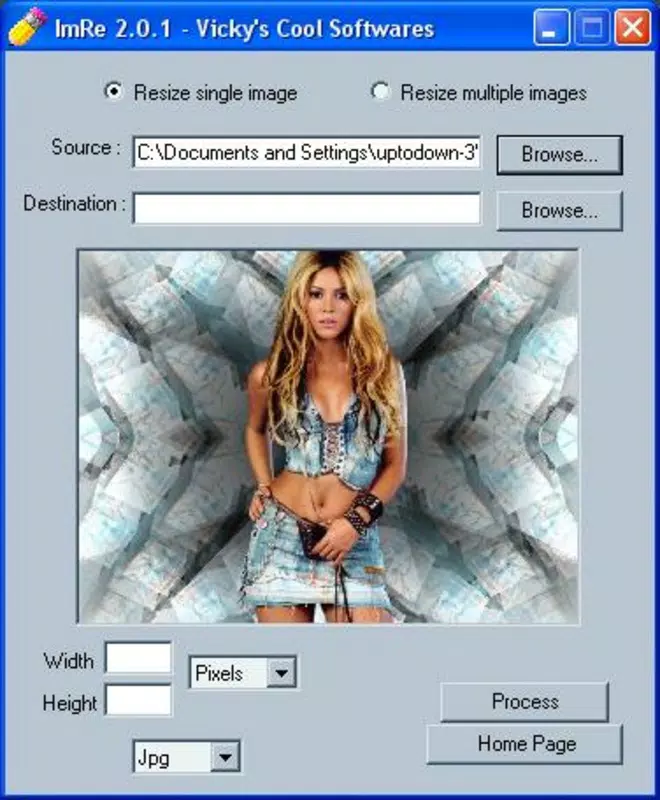
- Simple Interface: The app features a clean, intuitive layout that minimizes user confusion. Navigation is straightforward, allowing users to access core functions—such as image selection, resizing options, and export settings—with minimal effort.
- Fast Processing Speed: ImRe is engineered for rapid execution, enabling users to resize and convert images in seconds. This efficiency supports real-time sharing, making it suitable for users who need to send photos immediately after capturing them.
- Multiple Format Support: The app supports a variety of image formats, including JPEG and PNG, ensuring compatibility with most digital devices and platforms. This versatility allows users to convert files to the most appropriate format for their intended use.
- Email-Friendly Resizing: The primary purpose of ImRe is to optimize images for email transmission. By reducing file size while preserving visual quality, the app ensures that photos can be sent without triggering size-based restrictions from email providers.
For example, a traveler returning from a trip can select 150 high-resolution photos, apply a preset resize for email, and export them in under a minute. This capability transforms a tedious task into a seamless experience, enhancing both productivity and user satisfaction.
Interface, UX & Performance
The user interface of ImRe is designed with minimalism and functionality in mind. The layout prioritizes core actions—image selection, processing options, and export—ensuring that users can complete tasks with few taps. Visual hierarchy is maintained through clear labels, consistent iconography, and logical grouping of controls, which contributes to an overall sense of ease and predictability.
Navigating through the app is intuitive, with a linear workflow that guides users from image selection to final export. The absence of complex menus or hidden settings reduces cognitive load, making the app accessible even to those unfamiliar with image editing tools. Responsiveness is smooth during typical operations, with minimal lag when selecting files or applying transformations.
Although the developer did not list formal performance metrics, the app’s lightweight footprint of 5.2 MB suggests optimized resource usage. It is likely to perform consistently across a range of Android devices, including mid-tier and older models. Stability appears reliable, as the app has been in use since 2007 without reported widespread issues. However, specific performance data under heavy load or on low-end hardware was not disclosed.
Platform Compatibility & Technical Requirements
ImRe is available exclusively on the Android platform. The current version is 1.2.3, with a file size of 5.2 MB, indicating a compact and efficient design. The app is free to download and use, making it accessible to a broad audience.
The developer did not specify minimum OS requirements or device compatibility details. As such, users should verify compatibility with their specific Android version and hardware configuration. While the app’s long history suggests broad compatibility, it may not support the latest Android versions without updates. Users are advised to check for updates regularly to maintain functionality and security.
Pros and Cons
Pros
- Lightweight design at just 5.2 MB, minimizing storage impact.
- Free to download and use, with no in-app purchases or hidden fees.
- Efficient batch processing for handling multiple images simultaneously.
- Simple, user-friendly interface suitable for non-technical users.
- Optimized for email sharing by reducing file size without significant quality loss.
Cons
- Specific OS version requirements were not listed.
- Developer did not provide information on supported device types.
- No cloud integration or advanced editing features were mentioned.
- Updates may be infrequent given the app’s long release history.
- Only available on Android; no iOS or other platform support was indicated.
FAQ
Is ImRe safe to download and install?
Yes, ImRe is available as a free app on Android. While no third-party security scans were provided, the app’s long-standing presence and official distribution through trusted channels suggest it is secure. Users should always download from verified sources.
Can I use ImRe to resize images for social media?
While the app is optimized for email sharing, its resizing functionality can be adapted for other platforms. Users can manually adjust dimensions to match common social media requirements, though the app does not include preset templates for specific networks.
Does ImRe support image compression?
Yes, the app reduces file size through resizing and format conversion, which inherently includes compression. However, the developer did not specify the compression algorithm or quality settings used.
Is ImRe available for iOS devices?
Based on current information, ImRe is only available for Android. There is no official release or indication of future iOS support.
How often is ImRe updated?
The developer has not disclosed update frequency. Users are encouraged to check for updates regularly to ensure compatibility and security, especially on newer Android versions.
Final Thoughts
ImRe stands out as a focused, reliable tool for users seeking a straightforward solution to image sharing challenges. Its ability to process multiple photos quickly and convert them into email-friendly formats makes it an essential utility for travelers, photographers, and anyone managing digital memories. The app’s simplicity, speed, and free access enhance its value proposition, offering a practical alternative to more complex image editing software.
While it lacks advanced features and platform diversity, its niche focus ensures a streamlined experience without unnecessary distractions. For users who prioritize efficiency and ease of use, ImRe delivers consistent results with minimal effort. The app’s enduring presence since 2007 speaks to its reliability and continued relevance in a fast-evolving mobile landscape.
Download ImRe now


